Truck navigation for everything that happens between the turns. The route, the fuel stop, truck places ahead, safety and fleet alerts, live dispatch changes and arrival instructions in one driver experience. And for the fleet, a live view of what was planned and what actually happened.
Know what matters next.
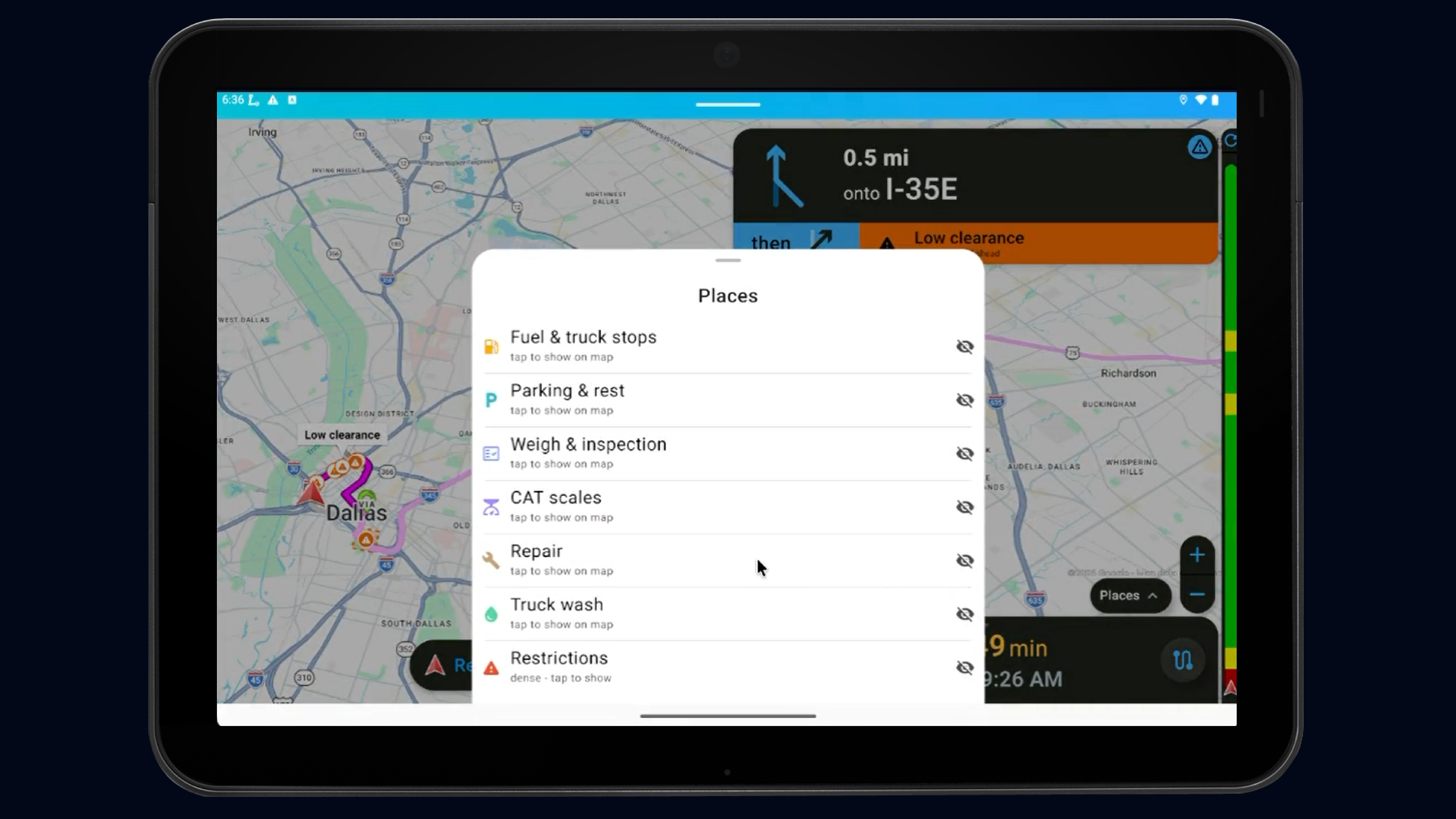
The next fuel stop. Open truck parking. A weigh station that is open. A low bridge ahead. The right customer entrance. A route change from dispatch. NavGuru brings what a driver normally hunts for across maps, messages and separate apps into the navigation, at the moment it becomes relevant.
While moving, NavGuru guides and protects. Search, comparison and explanation wait until the truck is stopped.
Put the fleet's operating knowledge in the cab.
Define preferred and restricted roads, yard speeds, customer gates, fuel strategy and routing policy once. NavGuru carries those decisions into every trip.
Dispatch sees the trip live, changes it when operations change, and gets the difference between the route planned and the route driven, in miles and dollars.
Everything a truck driver needs on the road ahead.
Not a map full of nearby pins. What is useful to this truck, on this trip. Results are ranked by what they cost the route, not by straight-line distance, and truck-incompatible places are excluded, not greyed out.
Truck parking and rest areas
Availability where live data exists
Truck fuel and fleet-preferred networks
FuelGuru prescribed stops with gallons
DEF, high-flow lanes
Weigh and inspection stations
Open or closed status
CAT scales
Truck repair and maintenance
Fleet-preferred locations
Truck and tank washes
Wash type and certifications
Low clearance, weight, hazmat
Fleet-restricted roads
Commercial entrances and gates
Docks, check-in, yard rules
While moving, one tap shows the single best option ahead and one button to add it. Stopped, get the full comparison: net price, prescribed gallons, parking availability, amenities. Add a stop and the route, tolls and fuel plan update with it.
While the truck is moving, NavGuru guides and protects.
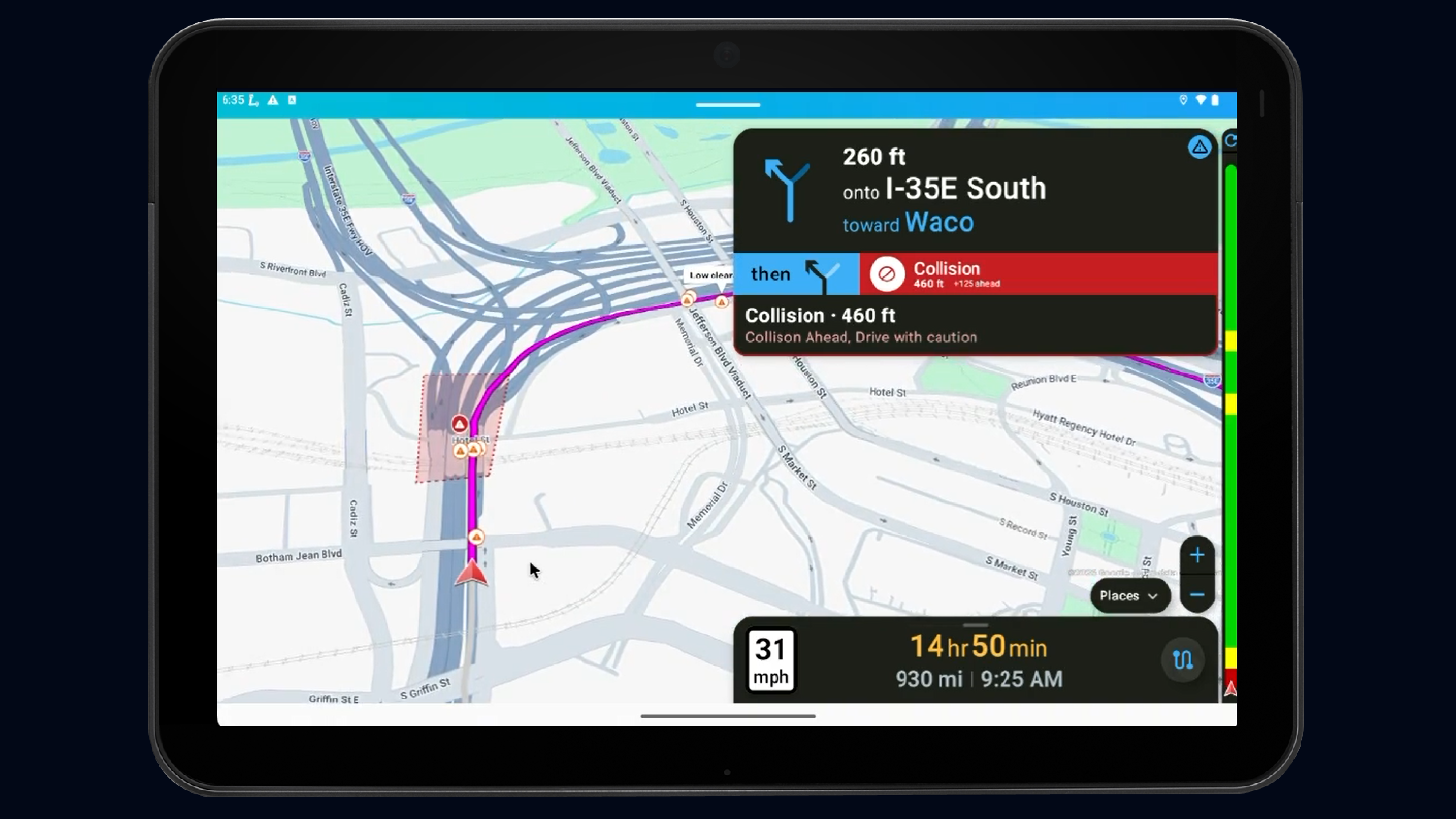
A place nearby is information. A decision approaching is an alert. Safety-critical alerts interrupt. Operational choices wait for a safe moment. Routine information stays in the rail.
Low clearance, weight, hazmat, closures, high wind, restricted roads. Staged alerts timed to the last exit where the driver can still act. The reroute is already applied.
Steep grade, sharp curve, speed change, yard speed, safety zones. One chip at a time. Auto-clears once passed.
Fuel fallback, parking, HOS break, dispatch change, faster truck-legal route. Offered once, with one button. No timers. Silence never changes the route.
Parking ahead, truck stop, wash, repair, weigh station status. Shown on the rail. Tap for detail when stopped.
Driver attention comes first
The next maneuver always wins. NavGuru never stacks five competing messages on the screen.
Warn before the decision point
Critical warnings are timed around when the driver can still safely act, not around a fixed distance.
Complex interactions wait until stopped
Dispatch text, comparison lists, deviation reasons and the satellite arrival preview unlock when the truck is stopped.
Every warning and what the driver hears: Driver guide →
Your fleet's knowledge travels with the route.
A low bridge in the back office does not help if the driver never hears about it. What the fleet knows becomes what the driver sees.
Dispatch and driver stay on the same trip.
Dispatch adds a stop or blocks a fuel station.
The driver's active trip updates without a restart. The change is logged and attributed to dispatch, not the driver.
A road closes.
The driver gets a new truck-legal route. Tolls and fuel are recomputed with it.
The driver deviates.
NavGuru reroutes from where the truck is. Dispatch sees the excess miles. The reason is asked for when the truck stops, never while moving.
Tracking is a fleet permission, not a default.
Some fleets run NavGuru as navigation only. Others turn on the live map, reroute events and post-trip measurement.
FuelGuru decides where the truck should buy fuel. NavGuru makes it happen on the road.
The prescribed stop is part of the driver's route, with the station and the gallons. Not a separate app the driver is supposed to remember to check.
The prescription
Which station, how many gallons, at the fleet's net price, inside the fleet's network rules. Priced on negotiated rates, not retail averages.
The execution
The stop appears in the turn-by-turn. If the stop becomes unavailable, or dispatch changes the trip, the route and the fuel plan recompute together and the driver's screen updates before the driver has a question to ask.
Connecting FuelGuru to NavGuru for your fleet: Set up FuelGuru with NavGuru →
How NavGuru Works
Plan
One route, chosen on truck constraints, fleet policy, tolls, fuel and operating cost. Historical GPS traces tell NavGuru which roads your fleet actually uses, so the route is one drivers will follow.
Dispatch
The trip goes to the driver with the fuel stop and fleet instructions already attached. Dispatch can inspect the alternatives. The driver gets one prescription.
Drive
Turn-by-turn on the tablet or app, HOS-aware, with the road-ahead intelligence and alerts the driver needs.
Adapt
Closures, dispatch changes, a missed stop, parking, traffic and safety conditions change the trip live. No restart.
Prove
Planned vs actual route, excess miles, reroute events, fuel execution. Dispatch changes and safety reroutes are never counted against the driver.
Setup steps, timings and the pilot test plan: Get started →
One trip. Dozens of decisions. One driver experience.
These capabilities live in one product because they all happen during the same driver's trip.
Proven Results
Measured using the fleet's actual routes and cost structure.
"No other routing system was able to show the routes our trucks are actually taking."
— Fleet CIO, 2,600-truck carrier, on stage at FreightWaves F3
Why NavGuru Outperforms Legacy Tools
| Capability | NavGuru | Legacy Hardware | Desktop Routing | Consumer Apps |
|---|---|---|---|---|
| Cost-based routing (fuel + tolls) | ✓ | ✗ | ⚠ | ✗ |
| Real-time cloud routing | ✓ | ⚠ | ✗ | ⚠ |
| Policy-aware navigation | ✓ | ⚠ | ✗ | ⚠ |
| Live rerouting mid-trip | ✓ | ⚠ | ✗ | ⚠ |
| No manual map updates | ✓ | ⚠ | ✗ | ⚠ |
| Truck places ahead on this route (parking, weigh, wash, repair, gates) | ✓ | ⚠ | ✗ | ⚠ |
| Routes learned from your fleet's GPS history | ✓ | ✗ | ✗ | ✗ |
| Fuel prescription inside the route, recomputed with it | ✓ | ✗ | ⚠ | ✗ |
| Truck alerts governed by fleet policy, with driver locks | ✓ | ⚠ | ✗ | ✗ |
| Dispatch changes the active trip | ✓ | ⚠ | ✗ | ✗ |
| Planned vs actual, with deviation attribution | ✓ | ✗ | ✗ | ✗ |
⚠ = Limited functionality or requires add-ons
Works with the systems already running your fleet.
NavGuru can originate the route or make an existing route executable, measurable and connected to fuel, driver and fleet intelligence. No rip and replace.
Planning and TMS
Your dispatch or routing system
PC*MILER geometry
MapUp co-optimized planning
In cab
Platform Science tablets (embedded, fleet toggles it on, no new hardware)
NavGuru app on Android and iOS
Prescription delivered into a third-party in-cab surface
Telematics
Geotab
Samsara
Motive
Platform Science
TomTom and OEM feeds
Which system is the source of truth for each part of the trip: Get started, section 4 → · Set up NavGuru on Platform Science →
Navigation alone is a commodity. The trip is not.
Most systems own one piece of the trip: planning, navigation, fuel, telematics or dispatch. NavGuru connects those decisions around the trip the driver is actually executing. What happened on this trip becomes part of how the fleet plans the next one.
Customer stories
What Customers Are Saying
Every partnership unlocks a new story of efficiency, and savings. Explore what our customers are saying.

“The utilization of GPS data, fuel-in-tank telemetry, and route planning allows the MapUp products for managing and auditing toll expenses, as well as fuel purchase planning. These tools afford us the opportunity to better utilize data in our edge environments to run a more efficient fleet.”